
From "that looks useful" to running on your PC.
One bot on your own computer. Every reel gets a number and its own worker, so you can keep scrolling and sending.
Send
An Instagram reel, a TikTok, a YouTube link, a video file or screenshots. Straight from the share sheet.
Understand
Whisper hears it and OCR reads every screen, on your computer: the exact tools, repos, links and commands, with where each appeared. A local model writes the summary; with a key, Gemini can watch instead.
Build
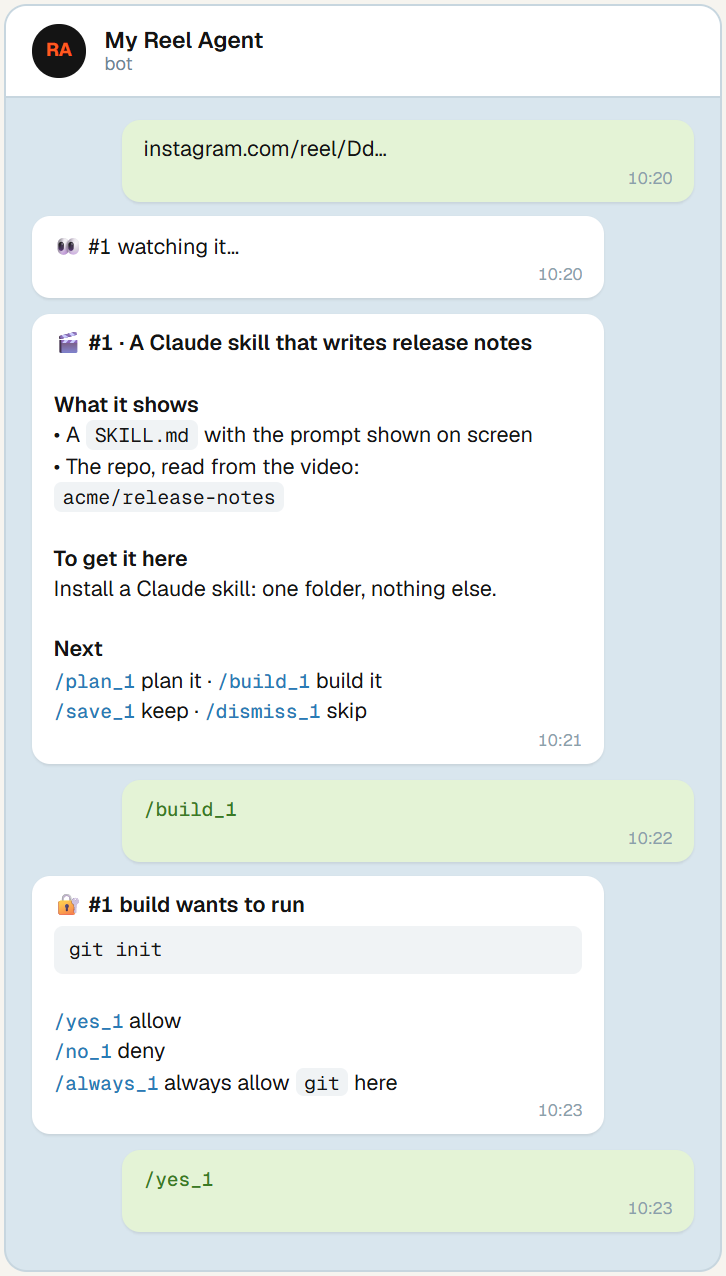
/plan 4, then /build 4 local. An open model builds it in its own git repo, and every shell command waits for your /yes.
A research assistant and a builder in one chat.
Everything runs through commands you can tap. Plain words work too: "build 4 with opus".
Honest breakdowns
What the video actually shows, not what the caption claims. Every command and link is quoted from the screen or the voice-over, never made up. /deeper 4 checks each repo and package on GitHub, npm and PyPI.
Pick your model
An open model on your computer (local, through Ollama or any OpenAI-compatible server), or Haiku, Sonnet, Opus, Fable or Codex, per task or per build.
Undo anything
Each build is a git repo: /diff 4 to review, /undo 4 to roll back, /deploy 4 only when you say so.
A searchable library
Every tool you scrolled past, numbered and tagged. /find, /saved, a Sunday digest.
Reminders that fire
/remind tomorrow 9:00 … pings your phone on time. On Windows it's booked in Task Scheduler, with nothing polling.
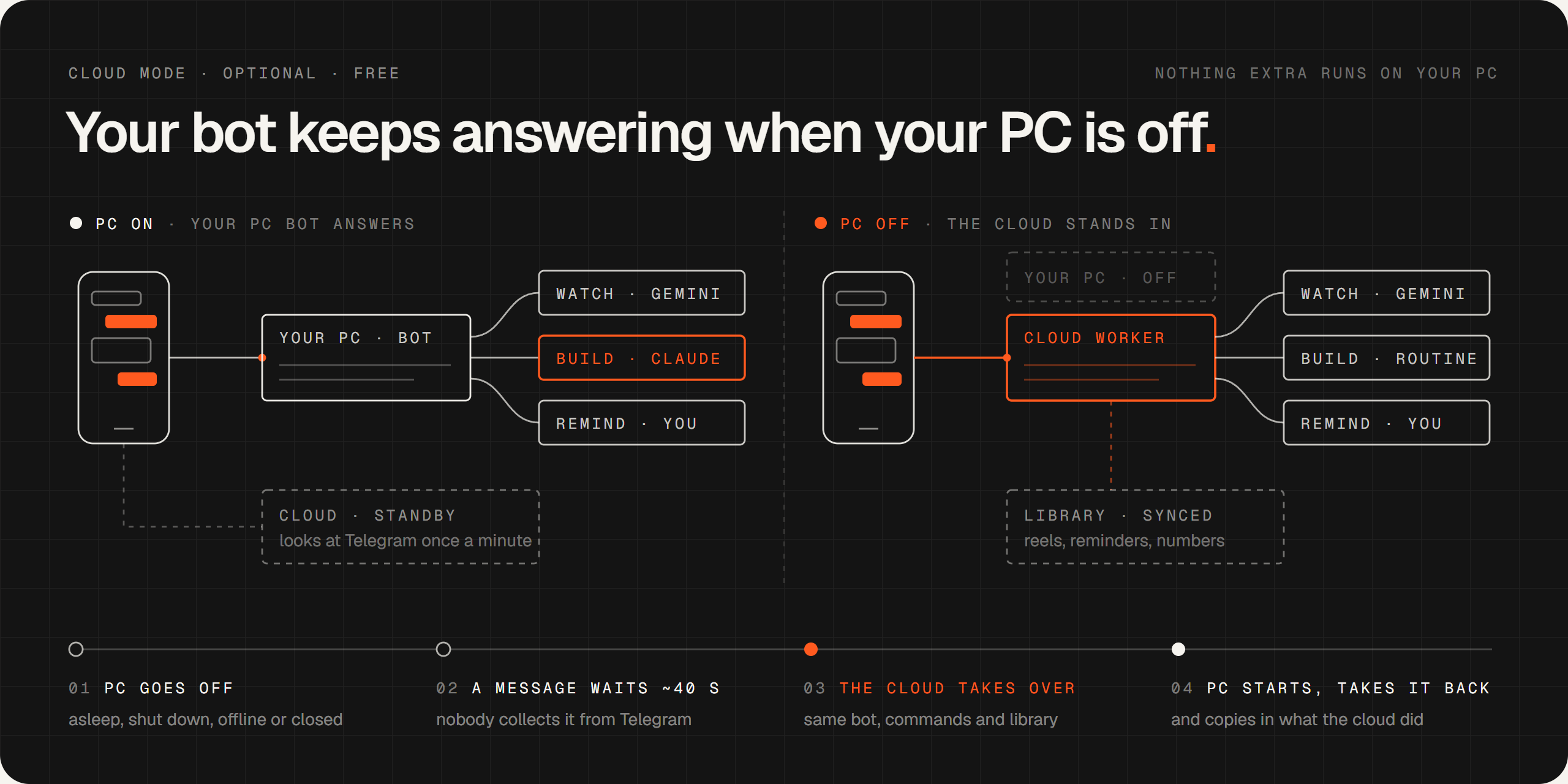
Works with the PC off
An optional, free Cloudflare Worker takes over the same bot in a minute or two, and hands it back when the PC starts.
It never obeys a reel.
Videos from strangers are data, not instructions. You stay in charge of everything that touches your PC.
- No command without your yes. There's deliberately no unattended mode.
- Reel content is untrusted. Captions, transcripts and model notes are never followed.
- Only your account. The bot answers the one Telegram account you pair.
- Builds stay in their folder. Writing anywhere else asks first.
- Your keys stay yours. The bot itself is blocked from reading them.
Up and running with open models.
You need Python 3.11+, Git, Ollama (or any OpenAI-compatible server) and Telegram. No account or API key. Message your bot, approve the pairing code it sends with python reelbot.py pair <code>, then send it a reel.
git clone https://github.com/HNF-FRN/Reel-watcher-telegram-Agent.git reel-agent
cd reel-agent
pip install -r requirements.txt -r requirements-open.txt
ollama pull qwen3:8b
# put TELEGRAM_BOT_TOKEN=<token from @BotFather> in .env
python reelbot.py
On Windows with a Claude Pro or Max plan? One command sets up the Claude Code bot instead (plain-English requests, Claude builds), asking before each change. The setup guide (PDF) has a screenshot for every step.
# Node.js first (skip if you have it), then open a new PowerShell window
winget install OpenJS.NodeJS.LTS

npx reel-agent
Just want the video watcher? From any terminal, or as a Claude Code plugin:
npx reel-agent watch <link>

# in Claude Code
/plugin marketplace add HNF-FRN/Reel-watcher-telegram-Agent
/plugin install reel-watch@reel-agent
Questions people ask.
Is it free?
Yes, with open models: the code is MIT-licensed and everything runs on your computer. Optional extras cost what they cost elsewhere: Gemini has a free tier, Claude Code needs a Claude Pro or Max plan, Codex uses your OpenAI account, and cloud mode fits Cloudflare's free plan.
Does it work on Mac or Linux?
Yes: python reelbot.py runs the whole bot (watching, plans, builds with approvals, reminders) on any OS. The Claude Code dispatcher and its one-command installer are Windows-only for now; issue #13 tracks porting them.
Which open models work?
Anything an OpenAI-compatible server serves (Ollama, llama.cpp, LM Studio, vLLM). Builds need a model that can call tools: qwen3:8b and bigger work well on a laptop, and the public CI builds and runs a script with qwen2.5:3b on a plain CPU. A vision model such as qwen2.5vl:7b also reads the frames for the summary.
Can a malicious reel take over my PC?
Reel content is treated as information only and is marked untrusted when passed to a build. No shell command runs without your /yes, and builds can't write outside their folder without asking.
Do I need a Gemini key?
No. Whisper transcribes the audio, OCR reads every screen and the exact commands and repos are pulled out on your computer; a local model writes the summary. With a key, Gemini watches the whole video with sound, which helps with videos that show more than they say or write.
What happens when my PC is off?
With the optional cloud stand-in, a Cloudflare Worker takes over the same bot after about 40 seconds of silence, answers from the cloud, and hands everything back when your PC starts. Nothing extra runs on the PC.
Stop saving reels you'll never set up.
Free, open source, and yours to change. A star helps other people find it.